PERMALINK
Why I Built the ASCII Bar Chart Console App
Visualizing data can be a powerful way to communicate insights, but sometimes you don’t need fancy charts.
Sometimes, a simple text-based solution can be effective.
TypeScript for Better Development
When I first started building the app, I considered using plain JavaScript.
But then I remembered why I love TypeScript: its static typing.
For example, using TypeScript allows me to easily enforce that the input data for the bar chart consists of numbers:
const rawData = args.data
  ? args.data.split(",")
      .map(item => item.trim())
      .filter(item => item.length > 0)
      .map(Number)
  : sampleData;
If the data contains non-numeric values, TypeScript will help identify them during development, reducing runtime errors.
Simple and Effective Design
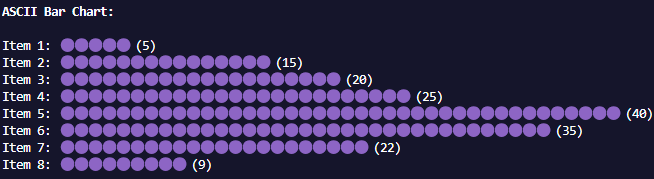
The app takes in a comma-separated list of numbers (either from command line arguments or a default sample data) and generates a simple ASCII/Emoji bar chart in the console.
Here’s how the basic structure of the main function looks:
const main = () => {
  const logger = new Logger();
  console.log("   ");
  logger.info("Starting ASCII Bar Chart Generator...");

  const args = parseArgs();

  try {
    const rawData = args.data
      ? args.data.split(",").map((item) => item.trim()).filter(item => item.length > 0).map(Number)
      : sampleData;

    if (rawData.some(isNaN)) {
      logger.error("One or more value is not a number!");
      throw new Error("Invalid input: All values must be numbers.");
    }

    renderBarChart(rawData);

  } catch (error) {
    if (error instanceof Error) {
      logger.error(error.message);
    } else {
      logger.error("Unknown error.");
    }
    process.exit(1);
  }
};
This function uses parseArgs to get input data, renderBarChart to create the ASCII bars, and a custom built logger to output messages.
By using TypeScript, I ensured that the input data is properly handled and validated any errors before rendering the bar chart.
User-Friendly Experience
The goal is to keep things simple while providing useful feedback when things go wrong.
Having clear error messages and logging is essential, even for a simple console app.
For example, if the user provides non-numeric data, the program will immediately notify them:
Error: One or more value is not a number!Next Steps
While the app works perfectly for simple use cases, there are a few ideas for improving it in the future:
- Add additional chart types (e.g., line charts or pie charts).
- Enhance the error handling and validation to support different data formats (e.g., CSV or TXT files).
- Allow users to customize the appearance of the bar chart, like changing the characters used for the bars.