Creating My Own Social Feed
Most modern websites have some kind of feed. Whether it is a social media timeline, a news aggregator, or a dashboard full of information. I wanted something similar for my own website but without the endless shittiness designed to maximize engagement.

Cartoon Credit Mr. Ollie
I wanted something simple:
A small window into what I am currently working on, reading, listening to, and learning.
Check it out the home page
The Idea
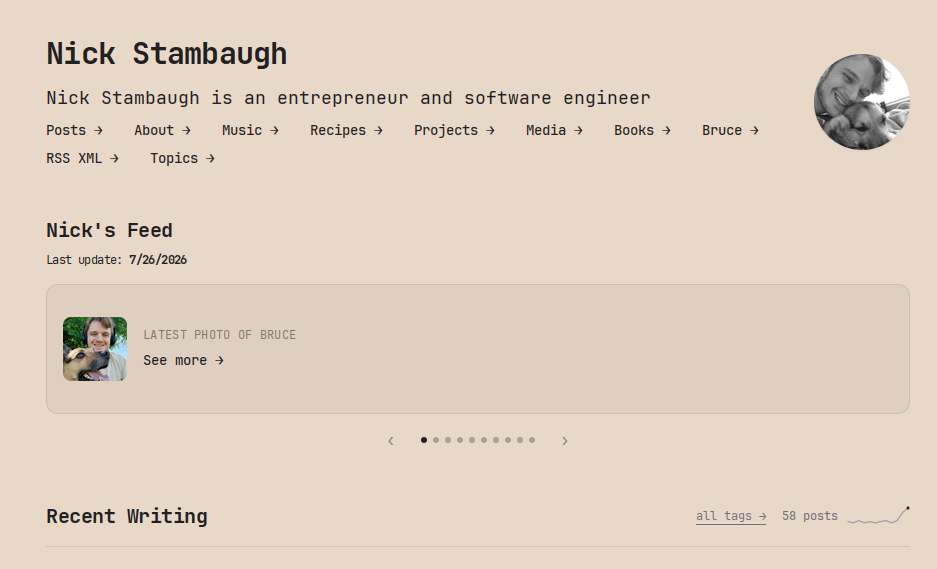
The “Nick’s Feed” carousel on my homepage is a lightweight personal dashboard. It combines different parts of my website with external APIs to create a constantly changing feed.
I hate manually updating things, so JavaScript handles the dynamic content.
Currently, the feed includes:
- The latest photo of Bruce
- My latest music project
- Latest recipe
- A random quote
- My latest library entry
- My newest blog post
- A random Wikipedia article
- Latest media entry
- My most starred GitHub repository
- Current weather
The goal was to make something that feels alive without becoming distracting.
Building the Carousel
Each item is a flex container. The carousel is controlled and hand-written with vanilla JavaScript.
The browser already provides everything needed:
- DOM manipulation
- CSS transitions
- Event listeners
- API requests
The current slide is updated by changing the translate position:
slidesWrap.style.transform = `translateX(-${current * 100}%)`;Each slide moves left by its own width. This creates the same effect used in modern UI.
Automatic Rotation
The feed automatically rotates every few seconds:
const AUTOPLAY_MS = 4750;

intervalId = setInterval(next, AUTOPLAY_MS);
I also added a few quality-of-life improvements:
- Pause when hovering over the feed
- Previous and next buttons
- Navigation dots
- Infinite looping
Small interactions like these make it feel polished.
Adding Live Data
The most interesting part of this project was connecting external APIs.
Weather
The weather section uses Open-Meteo to retrieve current conditions.
The website requests temperature and weather codes, then converts those codes into simple icons:
{
    0: "☀️",
    3: "☁️",
    61: "🌧️",
    95: "⛈️"
}
This simple API request turns a static website component into a real time data point.
Random Quotes
The quote slide pulls a random quote from an API:
const res = await fetch(
    "https://dummyjson.com/quotes/random"
);
The response is then inserted directly into the page. It makes every visit feel slightly different.
Wikipedia
One of my favorite additions is the random Wikipedia article.
Every page load requests a random article summary:
fetch(
    "https://en.wikipedia.org/api/rest_v1/page/random/summary"
);
The title, description, and link are then displayed inside the carousel.
It is basically a tiny “learn something random” button built directly into my homepage.
Why Not Use a Framework?
For a project like this, adding a framework would probably create more complexity than value.
The browser already knows how to:
- Fetch APIs
- Manipulate the DOM
- Handle animations
- Update content
The simplest solution is the best one.
The Bigger Idea
A personal website gives you complete control over what you share and how people experience it. I don’t want an algorithm deciding what someone sees, I can create my own small collection of things I care about.
That is the best part of building web apps.