Integrating Myself With Wikipedia
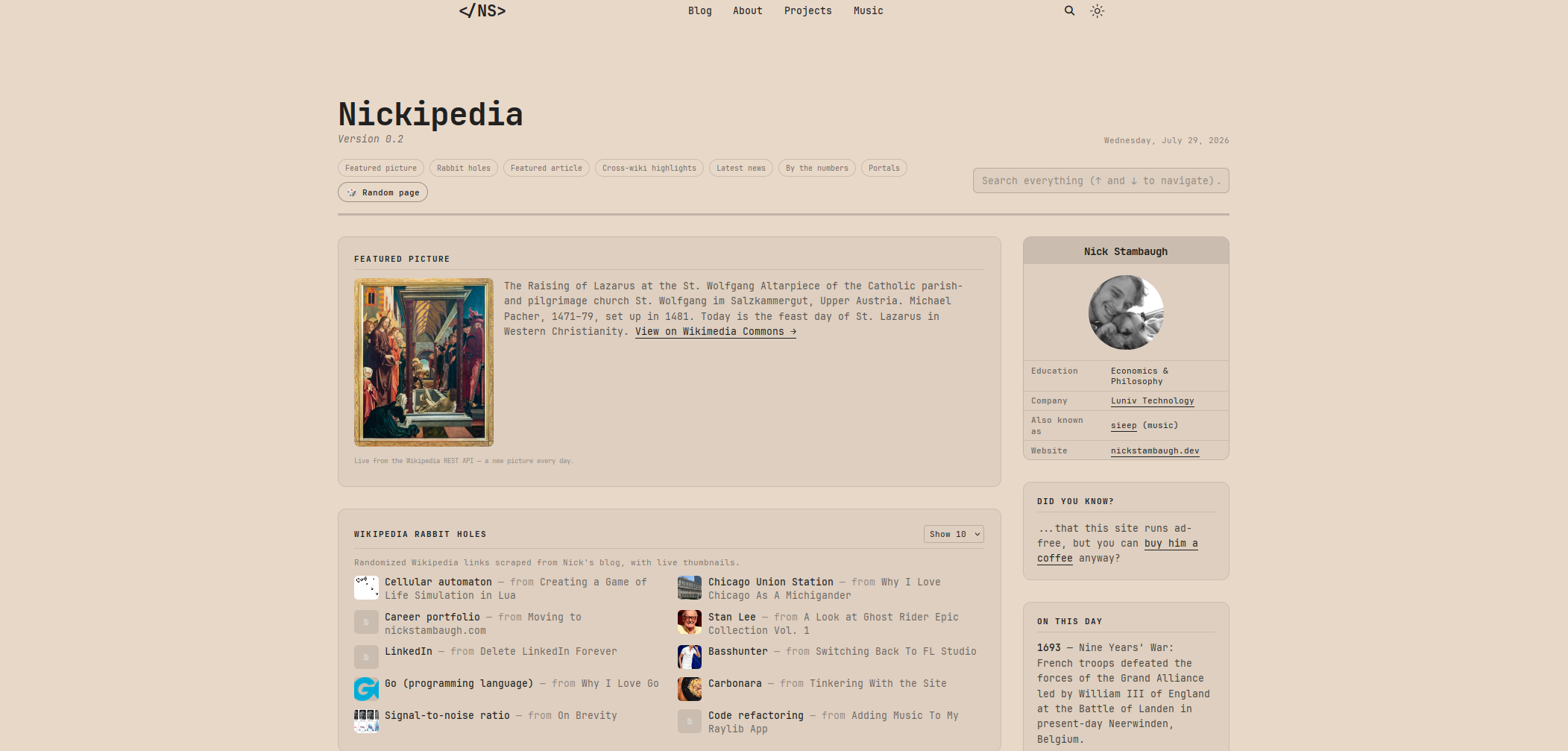
I’ve always loved the idea behind Wikipedia. So I decided to make a page on this website in a similar style.
I call it Nickipedia.

Making a clone of Wikipedia itself is impossible and also completely unnecessary. The goal was to make my own website feel less like a collection of pages and more like a connected knowledge base.
The Problem With Personal Websites
Most personal websites are boring.
There isn’t anything wrong with that but I wanted something closer to a personal archive, something closer to how I’ve learned information over the years. Something that represented all the random things I write about.
Over the last few months, the site had grown into a weird combination of:
- Blog posts
- Books I’ve read
- Movies and media I like
- Music I’ve released
- Software projects
- Recipes
- Random historical rabbit holes
Here was the issue: The library didn’t know about the blog. The blog didn’t know about the projects. The projects didn’t know about anything else.
Wikipedia solved this problem decades ago with links. Everything leads somewhere else.
Building The Data Layer
The first step was figuring out what information already existed.
The homepage already imported almost everything:
import { books } from "../data/library";
import { mediaList } from "../data/media";
import { tracks } from "../data/music";
import { featuredCases, openSourceProjects } from "../data/projects";
Instead of creating a database, I realized the site already had a lot of structured data.
The next step was combining everything into one searchable collection:
const unifiedSearchData = [
  ...postSearchData,
  ...librarySearchData,
  ...mediaSearchData,
  ...musicSearchData,
  ...projectSearchData,
];
Now the search bar searches the entire site. A book, a song, a project, or a blog post all exist in the same universe.
Creating The Wikipedia Rabbit Holes
A big reason Wikipedia is addictive is because every article is a doorway. I wanted to capture that feeling.
Since my posts already contained Wikipedia links, I wrote a script that scans every article and collects them.
const wikipediaLinksMap = new Map();

const wikiHrefPattern =
  /href="(https?:\/\/(?:[a-z]{2,3}\.)?wikipedia\.org\/wiki\/[^"]+)"/gi;

for (const post of allPosts) {
  let html = await post.compiledContent();

  for (const match of html.matchAll(wikiHrefPattern)) {
    const url = match[1];

    if (!wikipediaLinksMap.has(url)) {
      wikipediaLinksMap.set(url, {
        url,
        postTitle: post.frontmatter.title,
      });
    }
  }
}
Live Wikipedia Data
The next step was making the site pull information directly from Wikipedia. Wikipedia provides public APIs that anyone can use.
For example, the featured picture:
fetch(
  `https://en.wikipedia.org/api/rest_v1/feed/featured/${yyyy}/${mm}/${dd}`,
)
.then((res) => res.json())
.then((data) => {
  const image = data.image;
});
Every day, the site gets a new featured picture from Wikimedia Commons.
I also added “On This Day.”
fetch(
  `https://en.wikipedia.org/api/rest_v1/feed/onthisday/selected/${month}/${day}`,
)
.then((res) => res.json())
.then((data) => {
  console.log(data.selected);
});
Making Search Feel Like Wikipedia
The search system uses Fuse.js, which provides fuzzy matching.
Basically, it lets users find things even if they don’t type the exact title.
The search data looks like this:
{
  type: "Article",
  title: "The Labor Force Never Fully Came Back",
  description: "Analyzing BLS labor data",
  url: "/posts/labor-force"
}
Then Fuse searches across titles and descriptions:
const fuse = new Fuse(items, {
  keys: ["title", "description"],
  threshold: 0.3,
});
The result is a small internal search engine for everything I’ve created using an existing search algorithm.
Why Do This?
The modern web is increasingly becoming a collection of feeds controlled by algorithms. Everything is optimized for keeping you scrolling. Nickipedia lets you explore my personal knowledge base, enhanced by the best knowledge database we have: Wikipedia.
I wanted something slower. Something you can sink into.

The Future
This is only version 0.2.
There are plenty of things I want to add:
- More automatic cross-linking between posts
- Better article recommendations
- More Wikipedia API integrations
- Timeline views
- More metadata
- Maybe even a proper bubble graph showing how everything connects
Visit Nickipedia here.
Questions or corrections? Please email me at nickstambaugh@proton.me